
Delivery & Retries
HookRelay ensures reliable webhook delivery through automatic retries and intelligent retry policies. This guide explains how webhooks are delivered to your Next.js application and how failures are handled.
How Delivery Works
When a webhook provider (like Stripe) sends an event to HookRelay, here’s what happens:
1. Receipt & Storage
The webhook is received by HookRelay and immediately stored in the database. This ensures the event is never lost, even if your application is temporarily unavailable.
2. Validation
If you’ve configured a Provider Secret, HookRelay verifies the webhook signature to ensure it actually came from your provider (e.g., Stripe). Invalid signatures are rejected and not forwarded.
3. Queueing
The event is queued for delivery to your Next.js application. HookRelay maintains a queue of events waiting to be delivered.
4. Forwarding
HookRelay sends an HTTP POST request to your Forward URL (your Next.js API route) with:
- The webhook payload in the request body (as JSON)
- Special headers for identification and verification
- A 30-second timeout
5. Response Evaluation
Your Next.js handler responds with an HTTP status code. HookRelay evaluates this response:
- 2xx status codes → Success! Event is marked as succeeded
- 4xx status codes → Client error, typically not retried
- 5xx status codes → Server error, will be retried
- Timeout → No response within 30 seconds, will be retried
- Connection error → Network/DNS issues, will be retried
6. Retry or Complete
Based on the response:
- Success → Event is marked complete, no further action
- Retryable failure → Event is scheduled for retry with exponential backoff
- Non-retryable failure → Event is marked as failed immediately
Success Criteria
A delivery is considered successful when your Next.js handler:
- Returns a 2xx status code (200, 201, 202, 204, etc.)
- Responds within 30 seconds
- Doesn’t throw an unhandled exception
Example Successful Handler
// app/api/webhooks/stripe/route.ts
import { withHookRelay } from '@hookrelay/next';

export const POST = withHookRelay(
  async (event) => {
    // Process the webhook
    await processStripeEvent(event.payload);

    // Return 202 Accepted (or any 2xx)
    // The wrapper handles this automatically
  },
  { provider: 'stripe' }
);
The withHookRelay wrapper automatically returns 202 Accepted on success, so you don’t need to return a response manually.
Retry Behavior
When a delivery fails, HookRelay automatically retries with exponential backoff. This means the wait time between retries increases exponentially.
Default Retry Schedule
| Attempt | Wait Time | Total Time Since First Attempt |
|---|---|---|
| 1 | Immediate | 0 seconds |
| 2 | 1 minute | 1 minute |
| 3 | 5 minutes | 6 minutes |
| 4 | 15 minutes | 21 minutes |
| 5 | 1 hour | 1 hour 21 minutes |
Note: After 5 failed attempts, the event is marked as
failedwith reasonretry_limit_exceeded. You can manually replay it from the dashboard.
Why Exponential Backoff?
Exponential backoff helps in several ways:
- Temporary issues - Gives your application time to recover from brief outages
- Rate limiting - Avoids overwhelming your server with rapid retries
- Resource conservation - Reduces unnecessary load during extended outages
Retry Triggers
HookRelay automatically retries when these conditions occur:
1. Response Timeout
Your handler didn’t respond within 30 seconds.
Common causes:
- Long-running database queries
- Slow external API calls
- Heavy processing in the handler
Solution: Return quickly and process asynchronously:
export const POST = withHookRelay(
  async (event) => {
    // Queue for background processing
    await queueJob(event.payload);
    // Handler returns immediately
  },
  { provider: 'stripe' }
);
2. Server Errors (5xx)
Your handler returned a 500, 502, 503, or other 5xx status code.
Common causes:
- Unhandled exceptions
- Database connection errors
- Internal server errors
Solution: Fix the underlying issue. Check your application logs.**
3. Connection Errors
Network-level failures prevented delivery.
Common causes:
- DNS resolution failures
- Connection refused (server down)
- Network timeouts
- SSL/TLS errors
Solution: Ensure your application is running and accessible via HTTPS.
Non-Retryable Failures
Some failures are not automatically retried because they indicate a permanent issue:
4xx Client Errors
- 400 Bad Request - Invalid request format
- 401 Unauthorized - Authentication failed
- 403 Forbidden - Access denied
- 404 Not Found - Endpoint doesn’t exist
These typically indicate a configuration problem that won’t be fixed by retrying.
Exception: 429 Too Many Requests is retried (after a delay) because it’s a temporary rate limit.
Invalid Configuration
- Endpoint not found
- Invalid Forward URL
- Signature verification failures
These require manual intervention to fix.
Delivery Attempts
Every delivery attempt is tracked in detail. You can view the complete history in the event detail page:
Attempt Information
- Attempt Number - Sequential number (1, 2, 3, etc.)
- Status -
succeeded,failed, orpending - Response Status - HTTP status code from your handler
- Duration - How long the request took (milliseconds)
- Started At - Timestamp of when the attempt began
- Failure Reason - Classification if the attempt failed (see Failure Classification)
Example Attempt History
Attempt 1: Failed - handler_timeout (30,000ms)
  → Your handler took too long to respond

Attempt 2: Failed - handler_non_2xx (500 Internal Server Error)
  → Your handler returned a 500 error

Attempt 3: Succeeded - 202 Accepted (150ms)
  → Success! Event processed correctly
Headers Sent to Your Endpoint
When HookRelay forwards a webhook to your Next.js handler, it includes these headers:
Content-Type: application/json
X-HookRelay-Event-Id: hr_abc123def456...
X-HookRelay-Provider: stripe
X-HookRelay-Attempt: 1
X-HookRelay-Replayed: false
X-HookRelay-Timestamp: 1699123456
X-HookRelay-Signature: sha256=abc123...
Header Reference
X-HookRelay-Event-Id- Unique HookRelay event IDX-HookRelay-Provider- Provider name (stripe, github, etc.)X-HookRelay-Attempt- Delivery attempt number (1-based)X-HookRelay-Replayed- Whether this is a replayed event (trueorfalse)X-HookRelay-Timestamp- Unix timestamp when the request was sentX-HookRelay-Signature- HMAC SHA-256 signature for verification
Accessing Headers in Your Handler
The withHookRelay wrapper automatically extracts and validates these headers. You can access event metadata through the event object:
export const POST = withHookRelay(
  async (event) => {
    console.log(`Event ID: ${event.id}`);
    console.log(`Attempt: ${event.attempt}`);
    console.log(`Replayed: ${event.replayed}`);
    // ... your handler logic
  },
  { provider: 'stripe' }
);
Verifying HookRelay Signatures
The X-HookRelay-Signature header contains an HMAC SHA-256 signature that proves the webhook came from HookRelay. The withHookRelay wrapper verifies this automatically, but here’s how it works:
Signature Format
The signature is in the format: sha256=<hex-encoded-hmac>
Verification Process
- Extract the timestamp from
X-HookRelay-Timestamp - Get the raw request body
- Create a signed payload:
${timestamp}.${body} - Compute HMAC SHA-256 using your HookRelay Secret
- Compare with the signature in the header
Manual Verification (Not Recommended)
If you’re not using withHookRelay, you can verify manually:
import crypto from 'crypto';

function verifySignature(
  payload: string,
  timestamp: string,
  signature: string,
  secret: string
): boolean {
  const signedPayload = `${timestamp}.${payload}`;
  const expectedSignature = crypto
    .createHmac('sha256', secret)
    .update(signedPayload)
    .digest('hex');

  return signature === `sha256=${expectedSignature}`;
}
However, we strongly recommend using withHookRelay which handles this automatically.
Best Practices for Reliable Delivery
1. Respond Quickly
Your handler should return a 2xx status code as quickly as possible. For long-running operations, process asynchronously:
export const POST = withHookRelay(
  async (event) => {
    // Queue for background processing
    await queueOrderFulfillment(event.payload);
    // Returns immediately (handler completes in < 1 second)
  },
  { provider: 'stripe' }
);
2. Use Idempotency
Handle duplicate deliveries gracefully using the event ID:
export const POST = withHookRelay(
  async (event) => {
    // Check if already processed
    const processed = await db.events.findUnique({
      where: { hookRelayEventId: event.id }
    });

    if (processed) {
      console.log(`Event ${event.id} already processed`);
      return; // Idempotent - safe to skip
    }

    // Process the event
    await processEvent(event.payload);

    // Mark as processed
    await db.events.create({
      data: { hookRelayEventId: event.id, ... }
    });
  },
  { provider: 'stripe' }
);
3. Handle Errors Gracefully
Catch and handle errors appropriately:
export const POST = withHookRelay(
  async (event) => {
    try {
      await processEvent(event.payload);
    } catch (error) {
      // Log the error
      console.error('Failed to process event:', error);

      // Re-throw to trigger retry, or handle gracefully
      if (isRetryableError(error)) {
        throw error; // Will trigger retry
      } else {
        // Non-retryable - log and continue
        await logError(event.id, error);
      }
    }
  },
  { provider: 'stripe' }
);
4. Monitor Delivery Status
Regularly check the HookRelay dashboard for:
- Failed events that need attention
- High retry rates (indicates issues)
- Slow response times
5. Test with Replay
Use the replay feature to test your handler:
- Fix a bug in your handler
- Replay a failed event to verify the fix
- Ensure idempotency works correctly
6. Set Up Alerts
Configure alerts for:
- High failure rates
- Events stuck in retrying state
- Repeated failures for the same endpoint
Retry Flow Visualization
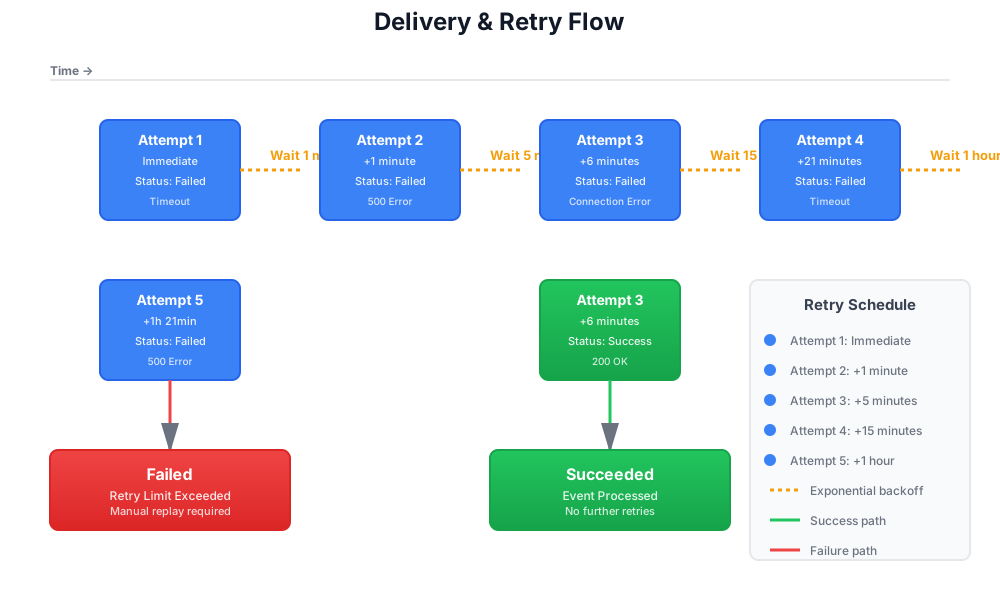
The diagram above illustrates the exponential backoff retry schedule. Failed deliveries are automatically retried with increasing wait times between attempts. If an attempt succeeds at any point, the event is marked as succeeded and no further retries occur.
Understanding Delivery vs Execution
It’s important to understand the difference:
- Delivery Success - HookRelay successfully sent the webhook to your handler
- Execution Success - Your handler successfully processed the webhook
HookRelay tracks both:
- If delivery fails → HookRelay retries automatically
- If execution fails → Your handler throws an error, HookRelay retries delivery
The withHookRelay wrapper reports execution outcomes back to HookRelay, so you can see both delivery and execution status in the dashboard.
Timeout Considerations
HookRelay has a 30-second timeout for delivery. This means:
- Your handler must respond within 30 seconds
- If it takes longer, the delivery is considered failed and will be retried
For Next.js on Vercel:
- Serverless functions have their own timeouts (10s for Hobby, 60s for Pro)
- Plan your handler execution time accordingly
- Use background jobs for long-running operations
Common Questions
Why did my event retry even though my handler succeeded?
This shouldn’t happen. If you see this, check:
- Your handler is actually returning a 2xx status code
- The
withHookRelaywrapper is being used correctly - There are no network issues between HookRelay and your app
Can I change the retry schedule?
The retry schedule is fixed for now. If you need different behavior, contact support.
What happens if my app is down for hours?
HookRelay will continue retrying according to the schedule. After 5 attempts (about 1.5 hours), the event will be marked as failed. You can replay it once your app is back online.
How do I know if a retry will succeed?
Check the failure reason in the event details. If it’s a temporary issue (timeout, 5xx), retries will likely succeed. If it’s a permanent issue (4xx, configuration error), you need to fix the underlying problem first.