
Events
Events represent individual webhook deliveries in HookRelay. Each event tracks the complete lifecycle from the moment it’s received from your webhook provider until it’s successfully delivered to your Next.js application (or marked as failed after all retry attempts).
What is an Event?
An event is a single webhook delivery instance. When Stripe sends a checkout.session.completed webhook, HookRelay creates an event record that tracks:
- The original webhook payload
- Delivery attempts to your application
- Success or failure status
- Retry attempts
- Timing information
Event Lifecycle
Events flow through a series of states as they’re processed:
1. Received
The event has been received from Stripe and stored in HookRelay’s database. At this point:
- The webhook payload is persisted
- Signature verification occurs (if configured)
- The event is assigned a unique HookRelay ID
2. Forwarded
The event has been queued for delivery to your Next.js application. HookRelay is preparing to send an HTTP POST request to your Forward URL.
3. Succeeded
Your Next.js handler successfully processed the webhook:
- Your handler returned a 2xx status code
- The handler completed without throwing an error
- HookRelay received confirmation of successful processing
4. Retrying
The event failed to deliver successfully, and HookRelay is waiting before the next retry attempt. This state appears between retry attempts during the exponential backoff period.
5. Failed
The event delivery failed after all retry attempts were exhausted:
- All retry attempts (typically 5) have been made
- The event will not be automatically retried again
- You can manually replay the event from the dashboard
6. Dead Lettered
The event exceeded the maximum retry attempts and has been moved to a dead letter queue. This is a terminal state indicating the event could not be delivered.
Event Details
Each event in HookRelay contains comprehensive information:
Core Identifiers
- Event ID (
hr_...) - Unique HookRelay identifier for this event - Provider Event ID - The original event ID from Stripe (
evt_...) - Provider - Source of the webhook (stripe)
- Provider Event Type - The specific Stripe event type (e.g.,
checkout.session.completed,invoice.payment_succeeded)
Delivery Information
- Status - Current state in the lifecycle (received, forwarded, succeeded, failed, etc.)
- Attempt Count - Number of delivery attempts made (e.g., “3 / 5”)
- Max Attempts - Maximum number of retry attempts configured
Timestamps
- Received At - When HookRelay received the webhook from the provider
- Last Attempt At - When the most recent delivery attempt was made
- Completed At - When the event reached a terminal state (succeeded or failed)
Verification
- Signature Verified - Whether the provider’s webhook signature was valid (if configured)
- Signature Error - Details if signature verification failed
Payload
- Payload - The complete webhook payload as JSON, exactly as received from the provider
Viewing Events
Events List Page
The Events page in your dashboard shows all webhook events:
- Filter by Endpoint - View events for a specific endpoint
- Filter by Status - Find all failed events, or only succeeded ones
- Search - Find events by ID or provider event ID
- Sort - Order by received time, status, etc.
Each event row shows:
- Event ID (truncated)
- Provider name
- Event type
- Current status (with color-coded badge)
- Number of attempts
- Received timestamp
Event Detail Page
Click any event ID to view complete details:
- Event Info - All identifiers, status, and verification details
- Delivery - Attempt count, timestamps, and replay controls
- Delivery Attempts - Complete history of each delivery attempt
- Payload - Full JSON payload viewer
Understanding Delivery Attempts
Each delivery attempt represents one HTTP POST request to your Next.js application. The attempts table shows:
- Attempt Number - Sequential number (1, 2, 3, etc.)
- Status - succeeded, failed, or pending
- Response Status - HTTP status code from your handler (200, 500, etc.)
- Duration - How long the request took (in milliseconds)
- Started At - Timestamp of the attempt
- Failure Reason - Classification if the attempt failed
Example Attempt History
Attempt 1: Failed - handler_timeout (30s timeout)
Attempt 2: Failed - handler_non_2xx (500 Internal Server Error)
Attempt 3: Succeeded - 200 OK (150ms)
This shows the event succeeded on the third attempt after two failures.
Replaying Events
Replaying an event creates a new event with the same payload and queues it for delivery. This is useful for:
- Testing - Verify your handler works correctly after making changes
- Recovery - Re-process an event that failed due to temporary issues
- Debugging - Reproduce issues in a controlled way
How to Replay
- Navigate to the event detail page
- Click the “Replay Event” button
- Confirm the replay action
- A new event is created with the same payload
- The new event will attempt delivery to your handler
Replay Behavior
- Idempotency - Replayed events respect idempotency rules. If your handler already processed the original event, the replay may be a no-op.
- New Event ID - Each replay gets a new HookRelay event ID
- Replay Flag - The
replayedproperty in your handler will betrue - Original Reference - Replayed events include a link to the original event
When to Replay
✅ Good reasons to replay:
- You fixed a bug in your handler and want to reprocess the event
- A temporary infrastructure issue caused the failure
- You want to test your handler with real event data
❌ Don’t replay if:
- The event already succeeded (it will be processed again)
- You haven’t fixed the underlying issue
- The event is for a one-time action (like charging a customer)
Event Status Flow Diagram
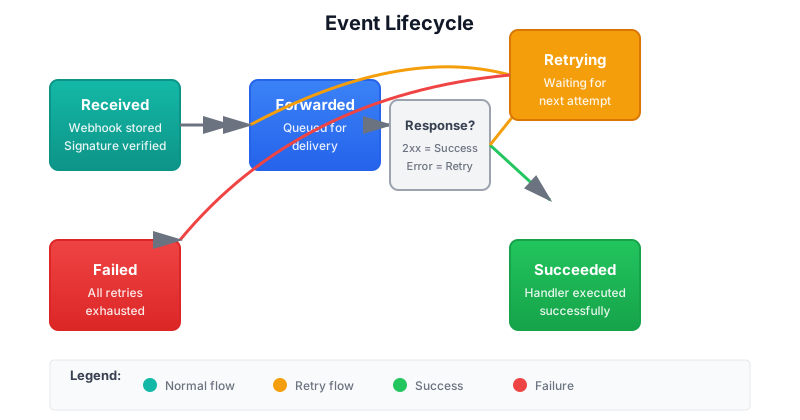
The diagram above shows how events flow through different states in HookRelay. Events start as “Received” and progress through “Forwarded” to either “Succeeded” (success path) or “Retrying” → “Failed” (failure path with retries).
Best Practices
- Monitor Failed Events - Set up alerts for events that fail
- Review Attempt History - Understand why events failed before replaying
- Use Event IDs for Idempotency - Store processed event IDs to prevent duplicate processing
- Check Payloads - Verify the payload structure matches what your handler expects
- Test with Replay - Use replay to test handler changes before deploying
Common Questions
Why does an event show “Succeeded” but my handler didn’t run?
This shouldn’t happen with HookRelay. If you see this, it likely means:
- Your handler returned a 2xx status code but didn’t actually process the event
- Check your handler logs to see if it actually executed
- Verify the event ID matches what you’re looking for
Can I see the exact request sent to my handler?
Yes! The delivery attempts table shows the response status and duration. The payload is available in the event detail page.
What happens if I delete an endpoint?
Events for that endpoint remain in the dashboard but won’t be delivered. You can still view them for historical purposes.
How long are events stored?
Event retention depends on your plan:
- Free: 7 days
- Pro: 30 days
- Team: 90 days
After the retention period, events are automatically deleted.