
Endpoints
Endpoints are the receiving points for Stripe webhooks in HookRelay. Each endpoint represents a connection between Stripe and your Next.js application. When Stripe sends a webhook to HookRelay, it’s received by an endpoint and then forwarded to your application’s webhook handler.
Understanding Endpoints
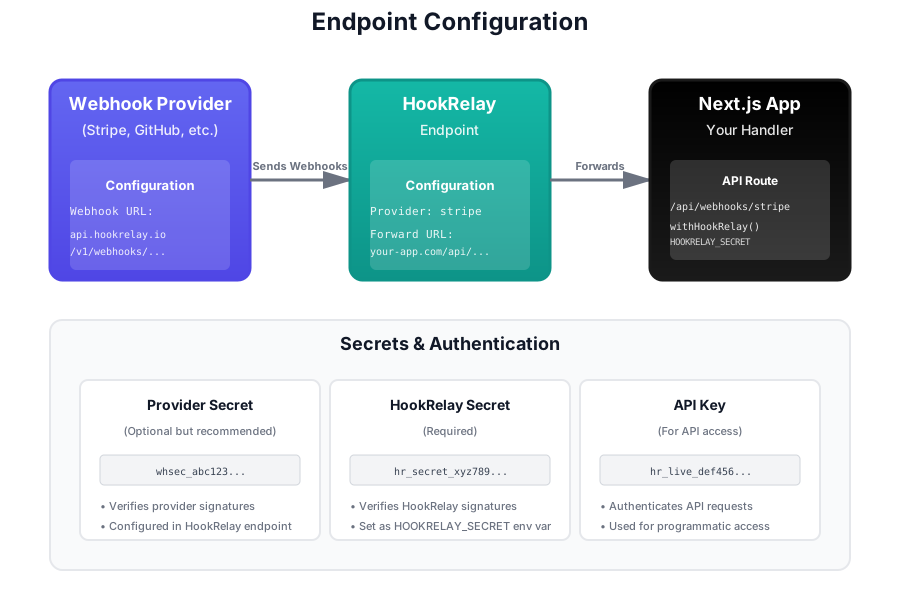
Think of an endpoint as a bridge:
- Stripe side: Receives webhooks from Stripe
- Application side: Forwards webhooks to your Next.js API route
Each endpoint has:
- A unique HookRelay URL that Stripe sends webhooks to
- A Forward URL that points to your Next.js application
- Configuration for signature verification
- Settings for retry behavior
Creating an Endpoint
Step-by-Step Guide
-
Navigate to Endpoints
- In the HookRelay dashboard, go to the Endpoints page
- Click the “Create Endpoint” button
-
Configure Forward URL
- Enter the URL of your Next.js webhook handler
- Must be HTTPS (required for security)
- Example:
https://your-app.com/api/webhooks/stripe - For local development, use a tunnel like ngrok:
https://abc123.ngrok.io/api/webhooks/stripe
-
Add Stripe Webhook Secret (Optional but Recommended)
- Enter your Stripe webhook signing secret
- Found in Stripe Dashboard → Developers → Webhooks → [Your Webhook] → Signing secret
- This enables signature verification for incoming webhooks
-
Create the Endpoint
- Click “Create” to save the endpoint
- You’ll receive a HookRelay Webhook URL and HookRelay Secret
Endpoint Configuration
Stripe Integration
HookRelay is built specifically for Stripe webhooks:
- Automatically extracts Stripe event IDs for idempotency
- Supports all Stripe webhook event types
- Verifies Stripe signatures when webhook secret is configured
- Extracts payment metadata (customer, amount, currency) for failed event recovery
Forward URL
The Forward URL is where HookRelay sends webhooks to your application. Requirements:
- HTTPS Required - All Forward URLs must use HTTPS for security
- Publicly Accessible - The URL must be reachable from the internet
- POST Endpoint - Your handler must accept POST requests
- JSON Payload - HookRelay sends the webhook payload as JSON in the request body
Example Forward URLs
# Production
https://myapp.com/api/webhooks/stripe

# Staging
https://staging.myapp.com/api/webhooks/stripe

# Local development (using ngrok)
https://abc123.ngrok.io/api/webhooks/stripe
Stripe Webhook Secret
The Stripe Webhook Secret is your signing secret from Stripe. When configured:
- Signature Verification - HookRelay verifies that webhooks actually came from Stripe
- Security - Protects against replay attacks and tampering
- Validation - Only verified webhooks are forwarded to your application
Where to Find Your Stripe Webhook Secret
- Go to Stripe Dashboard → Developers → Webhooks
- Click on your webhook endpoint
- Find “Signing secret” in the webhook details
- Click “Reveal” to see the secret (starts with
whsec_)
HookRelay Secret
Each endpoint automatically gets a unique HookRelay Secret. This is different from the Provider Secret:
- Purpose: Verify that webhooks forwarded to your app actually came from HookRelay
- Location: Shown in the endpoint details page
- Usage: Set as
HOOKRELAY_SECRETenvironment variable in your Next.js app - Header: Included in
X-HookRelay-Signatureheader when forwarding
The HookRelay Secret ensures that only legitimate webhooks from HookRelay reach your application, not direct requests from attackers.
Endpoint URLs
Each endpoint receives a unique HookRelay URL in the format:
https://api.hookrelay.io/v1/webhooks/{endpoint-id}The endpoint-id is a unique identifier like hr_endp_abc123...
Using the HookRelay URL
- Copy the URL from the endpoint details page
- Add to Stripe - In Stripe Dashboard → Developers → Webhooks → Add endpoint
- Select Events - Choose which webhook events to send (e.g.,
checkout.session.completed,invoice.payment_succeeded) - Save - Stripe will now send webhooks to HookRelay
Managing Endpoints
Viewing Endpoints
The Endpoints page shows:
- Endpoint ID (truncated)
- Provider name
- Forward URL
- Creation date
- Link to view details
Endpoint Details
Click any endpoint to see:
- Configuration - All endpoint settings
- HookRelay Webhook URL - The URL providers should use
- Forward URL - Where webhooks are sent
- Secrets - Masked provider secret and full HookRelay secret
- Recent Events - Last 5 events for this endpoint
- Danger Zone - Delete endpoint option
Editing Endpoints
You can update:
- Forward URL - Change where webhooks are delivered
- Provider Secret - Update or add the signing secret
Note: The HookRelay Webhook URL cannot be changed (it’s tied to the endpoint ID).
Deleting Endpoints
⚠️ Warning: Deleting an endpoint will:
- Stop all webhook forwarding immediately
- Prevent new webhooks from being received
- Not delete historical events (they remain for the retention period)
To delete:
- Go to endpoint details page
- Scroll to “Danger Zone”
- Click “Delete Endpoint”
- Confirm the deletion
Endpoint Limits
Endpoint limits depend on your plan:
- Free: 1 endpoint
- Pro: 5 endpoints
- Team: Unlimited endpoints
Best Practices
1. Use HTTPS for Forward URLs
Always use HTTPS URLs. HTTP is not supported for security reasons.
✅ https://myapp.com/api/webhooks/stripe
❌ http://myapp.com/api/webhooks/stripe
2. Configure Stripe Webhook Secret
Enable signature verification by adding your Stripe webhook signing secret. This adds an extra layer of security.
3. Verify HookRelay Signatures
In your Next.js handler, verify the X-HookRelay-Signature header using the HookRelay Secret. The withHookRelay wrapper does this automatically.
4. Use Descriptive Forward URLs
Organize your webhook handlers clearly:
✅ /api/webhooks/stripe5. Monitor Endpoint Health
Regularly check:
- Recent events for each endpoint
- Success/failure rates
- Any failed deliveries
6. Test Before Production
- Use ngrok or similar for local testing
- Verify webhooks are received and forwarded correctly
- Test with replay functionality
7. Keep Secrets Secure
- Never commit secrets to version control
- Use environment variables
- Rotate secrets periodically
- Use different secrets for development and production
Common Issues
”Endpoint not found” errors
- Verify the endpoint still exists in the dashboard
- Check that you’re using the correct endpoint ID in the URL
Webhooks not being forwarded
- Verify the Forward URL is correct and accessible
- Check that your Next.js handler is deployed and running
- Ensure the Forward URL uses HTTPS
Signature verification failing
- Verify the Stripe Webhook Secret matches what’s in your Stripe dashboard
- Check that you’re using the correct secret (not the HookRelay Secret)
- Ensure the secret hasn’t been rotated in Stripe
Too many failed events
- Check your Forward URL is correct
- Verify your Next.js handler is responding correctly
- Review failure classifications in the Events page
- Test your handler with the replay feature